Obsidian Bases · Plugin
A Kanban board for Obsidian Bases
with filtering and drag-and-drop
Card Columns: group by properties,
filter tags with AND/OR
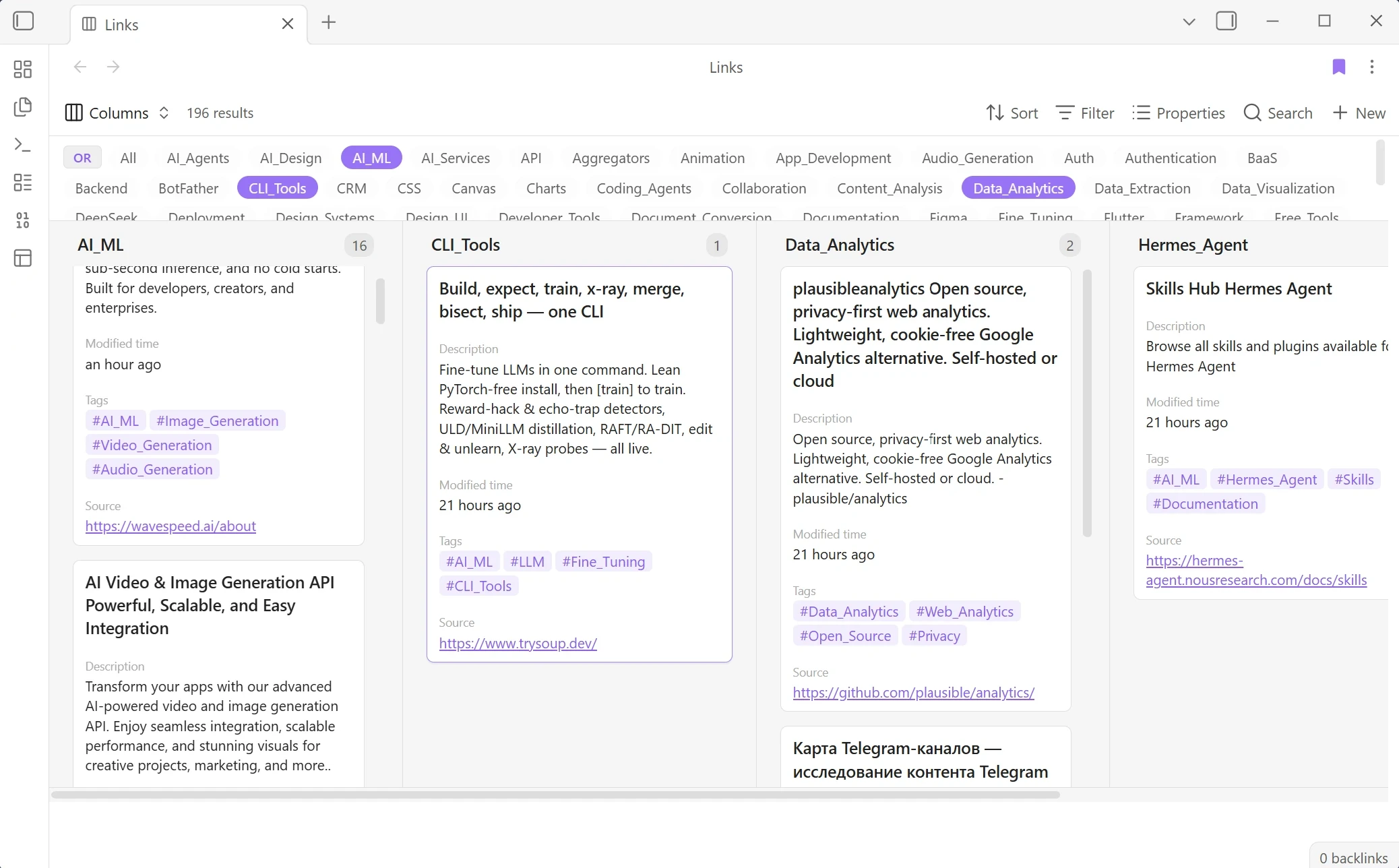
I built Card Columns as an additional card view for Obsidian Bases. The built-in Cards view showed notes in a grid, but I needed columns. I couldn't find a ready-made plugin for the scenario I wanted, so I built my own. The plugin is listed in the Obsidian Community directory and is open source under the MIT license.
Another card view for Bases
In Obsidian Bases, I configure a query in the UI and choose how to display its results: as a table, list, or cards. Card Columns adds another card view, grouping notes into columns by a selected property.
I set sorting, filters, search, and visible properties in the native Bases toolbar. Columns uses that result and changes only its presentation. Browsing does not change notes. Dragging a card updates the property used to group the columns.
Group first, filter second
In the Bases toolbar, I choose Group by and select a tag, status, category, or another property. With no group selected, Columns groups by tags. Changing Group by reshapes the columns.
Tag pills sit under the toolbar, beside the board. A regular click filters to that tag; clicking another adds it in OR mode. Ctrl-click or right-click toggles one tag without clearing the rest. OR/AND switches between matching any selected tag and matching all of them. All clears the filter.
Tag pills refine the current results. The native Filter sets the main conditions in the toolbar, while the pills quickly narrow the view without taking me away from the board.
Cards show the fields I need
I choose visible fields from the native Properties list. The first selected property becomes the title; the rest appear as chips: text, tags, links, booleans, and dates. Properties chips can be stacked vertically or arranged in a compact grid. I can also set wrapping for multi-line values and date formats. The cards show the fields selected for each database without changing the notes themselves.
For a cover, I can use the first image in a note or a frontmatter property value. The settings control its aspect ratio (Auto, 1:1, 3:2, 4:3, or 16:9), fit, and position. I can open a card in the active pane, a modal, a new tab, or a split. In a split, a click reuses the pane; Ctrl-click opens another tab in that pane. The board stays in view, so I can follow the current query.
Designed to fit Obsidian
I designed and built the interface directly in code, without Figma or another design editor. I followed Obsidian’s design system so Columns feels like part of the app.
Dragging a card edits its note
Version 0.9.0 supports moving cards between columns. When a card moves, Columns updates the
grouping property through Obsidian’s processFrontMatter() API. On a status board, that
changes the note’s status. If the property is a list, Columns replaces the moved value and leaves
the others intact.
Drag-and-drop is enabled by default. A switch in General settings turns it off, so the board will not update frontmatter when cards move.
Settings grouped by type
General, Title, Properties, and Cover group settings by what they control, so the one I need is easier to find. In General, I set card width, one to six columns per group, and column order. I can leave the order automatic or set it manually; the manual layout keeps empty columns in place. A lane such as Done stays visible even when it has no cards yet.
Grid layout places several cards side by side. Masonry fills vertical gaps, while zebra striping makes a wide board easier to scan. Title style, property chips, dates, and covers have their own controls, so the same view can fit different databases.
From development to release
I develop Card Columns with Hermes Agent. The source code lives on the agent’s VPS, and the built plugin is synced to my laptop. I test it there in my Obsidian vault.
If it works as expected, the agent’s scripts send the changes to Gitea and GitHub. I initiate the release of each new version in the Obsidian Community directory myself.
Result: a board inside Obsidian Bases
Card Columns keeps notes in Bases while changing how I browse them. I choose a grouping, filter by tags, and open cards beside the board. When I need to change a status, moving a card updates the property used to build the columns.
By the end of September 2026, Card Columns had 846 organic downloads in the Obsidian Community directory. The listing showed version 0.9.0. On GitHub, Card Columns had four stars and two issues. One bug report is closed; one request to choose a property for covers is still open. Some requested improvements have already shipped. The plugin supports Obsidian 1.8.0+ on desktop and mobile under the MIT license.

